
Conveyor Troubleshooting
How to Fix Drive Pulley Slippage: Practical Troubleshooting for Conveyor Engineers

Vijay Baid
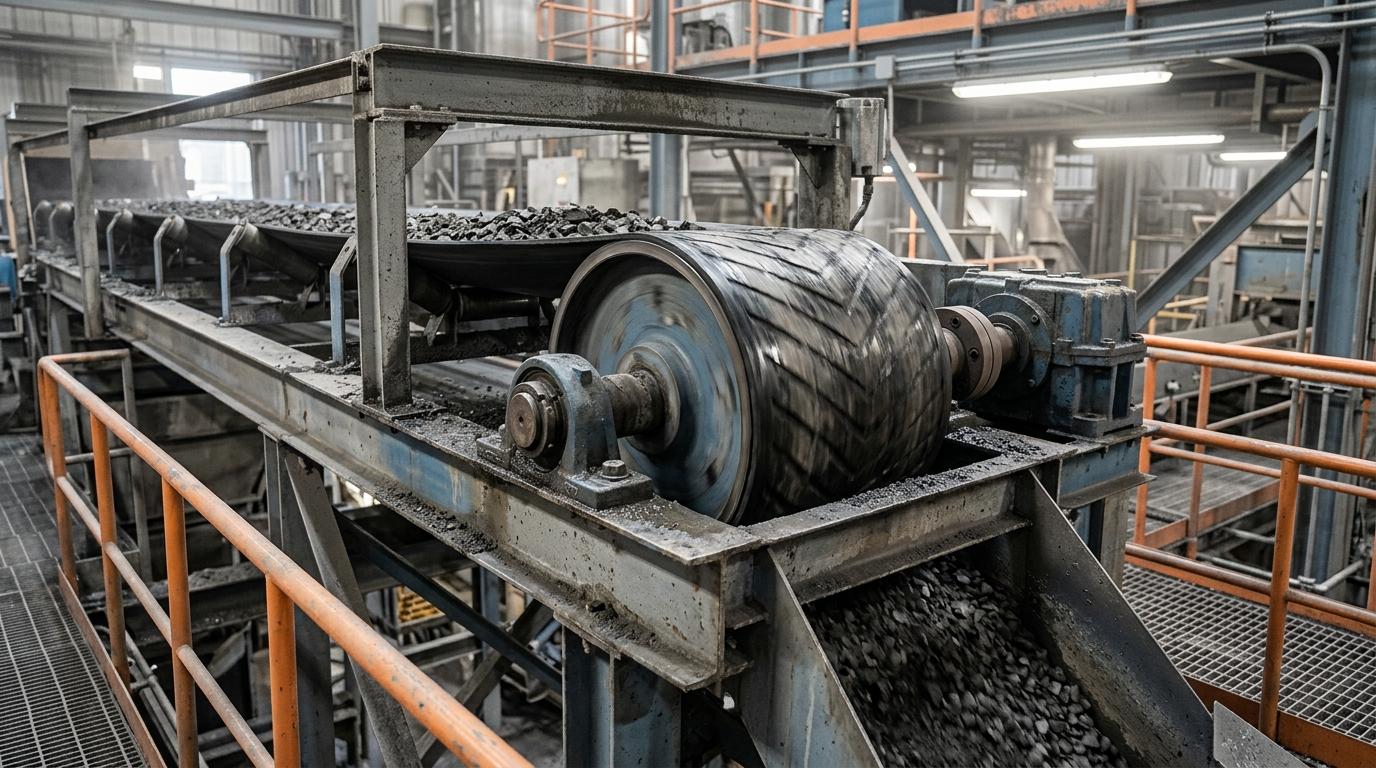
TL;DR: Drive pulley slippage happens when the belt does not have enough grip on the drive pulley. It can be caused by low belt tension, worn lagging, water, material build-up, low wrap angle, or high conveyor load. The right fix depends on the actual cause. Adding more belt tension is not always the answer.
Drive pulley slippage is a common warning sign in belt conveyor systems. When the belt slips on the drive pulley, the pulley keeps turning while the belt moves more slowly than it should. This creates friction and heat. Over time, it can damage the belt cover, pulley lagging, and other conveyor parts.
Slippage can also reduce conveyor performance and cause unexpected shutdowns. The good news is that most slip problems can be traced to a few key areas: belt tension, pulley lagging, contamination, wrap angle, and conveyor load.
This guide explains how drive pulley slippage happens, how to spot it, how to find the root cause, and how to fix the problem.
What Causes Drive Pulley Slippage?
A belt conveyor needs enough grip between the belt and drive pulley to move the load. When the belt does not have enough grip, it starts to slide over the pulley surface.
This can happen when:
Belt tension is too low
Pulley lagging is worn or smooth
Water or material gets between the belt and pulley
The belt has too little contact with the drive pulley
The conveyor is carrying more load than expected
Material or equipment is creating extra resistance
These factors work together. For example, increasing belt tension may help if the belt is loose. But it will not solve the problem if worn lagging or wet material is reducing grip at the pulley. Always find the cause before you make an adjustment.
How Does a Drive Pulley Lose Grip?
The drive pulley transfers power from the motor to the conveyor belt. For this to happen, the belt must have enough contact and friction with the pulley surface.
Five main factors affect this grip.
1. Belt Tension
The belt needs the correct amount of tension to stay in contact with the drive pulley. If the tension is too low, the belt may slip during startup or when the conveyor is heavily loaded.
2. Pulley Lagging
Lagging is the material fitted around the pulley surface. It helps improve grip between the belt and pulley.
Over time, lagging can become:
Smooth
Glazed
Worn
Cracked
Damaged
Covered with material
When this happens, the pulley may lose traction.
3. Wrap Angle
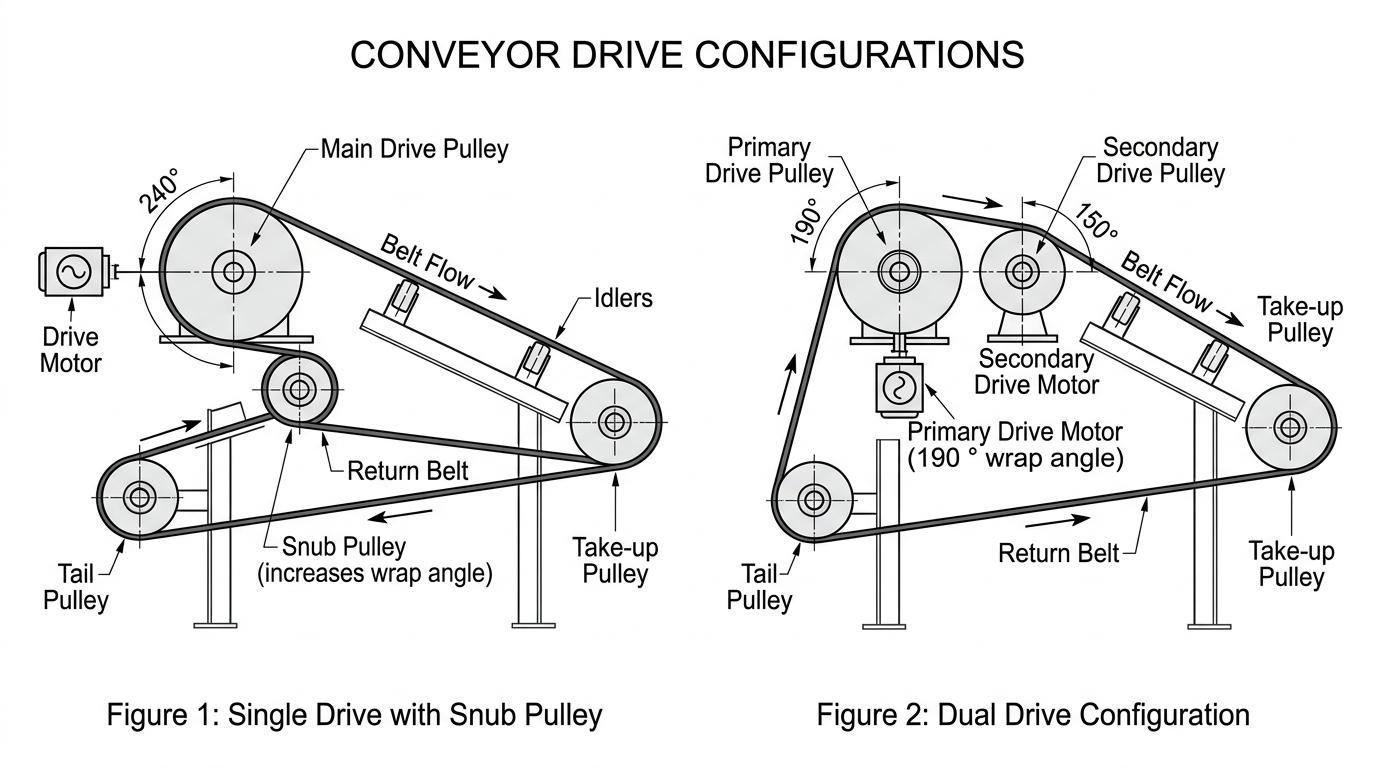
Wrap angle is the amount of the pulley surface that touches the belt. More contact can provide more grip. If the conveyor has a low wrap angle for its duty, the belt may slip even when the tension and lagging are in good condition.
4. Water and Material Build-Up
Water, mud, slurry, fines, oil, and carryback can get between the belt and pulley. This creates a poor contact surface and can reduce friction. Wet conditions can make the problem worse, especially during conveyor startup.
5. Conveyor Load
A heavy load needs more power from the drive. Plugged chutes, seized conveyor idlers, dragging skirts, or other forms of resistance can also increase the load on the drive. If the required drive force becomes too high, the belt may start to slip.
Signs of Drive Pulley Slippage
Drive pulley slippage does not always start with a major failure.
There are often warning signs that maintenance teams can spot early.
Squealing or Chirping
A squealing sound during startup can mean that the belt is sliding over the pulley.
Burnt-Rubber Smell
Slip creates heat through friction. A burnt-rubber smell can be a sign that the belt and pulley are getting too hot.
Black Dust
Black dust around the drive pulley may come from wear on the belt cover or pulley lagging.
Smooth or Shiny Lagging
A pulley surface that looks polished or glazed may have lost some of its useful grip.
Hot Pulley or Belt
If the pulley shell or belt cover becomes unusually hot, continued slip may be taking place.
Unstable Starts
The conveyor may struggle to start when it is loaded, even though it starts normally when empty.
Maintenance teams should not ignore these signs. Continued slippage can turn a small maintenance issue into belt damage, lagging failure, or an unexpected shutdown.
How to Diagnose Drive Pulley Slippage
Before changing the belt tension or replacing the pulley, find out when and why the slip occurs. Use this simple inspection process.
Step 1: Check When the Slip Happens
First, compare startup, empty running, and loaded running.
Slip only during startup may point to low traction or high starting load.
Slip only under heavy load may point to overload or extra resistance.
Slip during normal running may point to a serious traction or tension problem.
This first check can help narrow down the cause.
Step 2: Inspect the Pulley Lagging
Look closely at the pulley surface.
Check for:
Smooth or glazed areas
Worn grooves
Cracks
Loose or damaged lagging
Material stuck in the grooves
Exposed pulley shell
If you find a damaged pulley surface, repair it or replace it before the slip worsens.
Step 3: Check the Take-Up
The take-up system keeps the belt at the correct tension.
Check whether:
The take-up has reached the end of its travel
A gravity take-up is stuck
A screw take-up needs adjustment
The belt has stretched more than expected
A take-up that cannot maintain the required tension can lead to slip.
Step 4: Check for Water and Material
Look for water, slurry, fines, mud, oil, or carryback around the drive. Also inspect the belt cleaners and other parts that control material build-up. If inspection or cleaning needs to happen near moving parts, follow OSHA conveyor lockout guidance before removing a jam or overload condition.
Step 5: Check the Wrap Angle
Look at how much of the drive pulley is in contact with the belt. If the contact area is too small for the conveyor duty, a snub pulley or another layout change may be needed.
Step 6: Check the Conveyor for Extra Resistance
The drive may be slipping because the conveyor needs more power than normal.
Check for:
Plugged chutes
Seized idlers
Dragging skirts
Material build-up
Poor loading
Overloaded belt
If the empty belt runs well but starts slipping when loaded, investigate the load and conveyor resistance.
Common Causes and How to Fix Them
The correct repair depends on what the inspection finds.
What you see | Possible cause | What to check first |
|---|---|---|
Slip during wet startup | Water or poor pulley grip | Clean the pulley and inspect lagging |
Slip after long service | Worn or glazed lagging | Repair or replace the lagging |
Take-up near the end of travel | Low belt tension | Check take-up movement and belt stretch |
Slip only under heavy load | High load or extra drag | Check loading, chutes, idlers, and resistance |
Repeated slip with low belt contact | Low wrap angle | Review the snub pulley and drive layout |
Slip with material-filled pulley grooves | Carryback or contamination | Improve cleaning and material control |
This is why there is no single fix for every conveyor. The same symptom can come from different problems.
How to Fix Drive Pulley Slippage
1. Set the Correct Belt Tension
Start by checking whether the belt has enough tension. Make sure the take-up can move freely and is set correctly. Do not simply keep increasing tension until the slipping stops.
Too much tension can put extra stress on:
Bearings
Shafts
Belt splices
Belt structure
It may also hide the real cause of the problem.
2. Repair or Replace Worn Lagging
If the lagging on the conveyor pulley is smooth, worn, cracked, loose, or badly damaged, it may no longer provide enough grip. In that case, the pulley surface should be restored.
The right lagging type depends on the conveyor duty, moisture, load, and operating conditions. For wet or high-load applications, engineers often select higher-grip lagging.
3. Keep the Drive Area Clean
A clean drive pulley helps maintain good contact between the belt and pulley.
Check:
Primary belt cleaners
Secondary belt cleaners
Return belt
Material carryback
Water entry points
If wet fines or slurry keep reaching the pulley, cleaning the pulley alone will not solve the problem. The team also needs to control the source of the contamination.
4. Review the Wrap Angle
If the belt does not have enough contact with the drive pulley, the system may need a layout change. A snub pulley can increase the belt's contact around the drive pulley.
Treat this as an engineering change. Review the full pulley arrangement before you move or add components.
5. Reduce Extra Conveyor Resistance
Sometimes the drive pulley is not the real problem. A plugged transfer chute, seized idler, dragging skirt, or material build-up can make the belt harder to move. This increases the load on the drive and can cause slip. Check the full conveyor instead of focusing only on the head pulley, and make sure guarding around drive, head, and tail pulleys reflects MSHA moving-parts protection guidance where similar hazards apply.
What Not to Do When the Belt Slips
Some quick fixes can create bigger problems later.
Do Not Keep Restarting the Conveyor
Repeated slipping creates more heat and can damage the belt and lagging.
Do Not Increase Tension Without Checking the Cause
More tension is not a complete solution. It can overload other conveyor components if the real issue is worn lagging, contamination, or extra resistance.
Do Not Ignore Water and Carryback
Wet material and carryback can quickly reduce grip between the belt and pulley.
Do Not Replace Lagging Without Checking the Load
New lagging may still slip if the conveyor is overloaded or has high resistance.
Do Not Use Belt Dressing or Adhesive Sprays
Do not use belt dressing, resin, or spray adhesives as a quick way to stop industrial conveyor slippage. These products can damage rubber surfaces, collect abrasive material, and create additional safety risks. The cause of the slip should be corrected instead, especially because conveyors are repeatedly linked to well-known trapping and nip hazards in official safety guidance.
How Lagging Affects Drive Pulley Grip
Pulley lagging has a direct role in maintaining traction. Different lagging types can suit different operating conditions.
For example, grooved rubber lagging can help move water and fines away from the belt contact area. Engineers often choose ceramic lagging for demanding applications that need high grip and wear resistance. Base that choice on the actual conveyor conditions instead of using one lagging type for every system.
When Should You Consider a Snub Pulley?
Engineers can use a snub pulley to increase the amount of belt contact around the drive pulley. This can help when the current wrap angle does not match the conveyor duty. However, a snub pulley will not fix every slip problem.
Before changing the layout, check:
Belt tension
Lagging condition
Contamination
Conveyor load
Drive arrangement
Existing wrap angle
If these areas are already in good condition and the belt still does not have enough grip, the conveyor may need a layout review.
If the same conveyor keeps slipping even after basic adjustments, the problem usually runs deeper than tension alone. A technical review can help you confirm whether the issue is in the pulley surface, take-up condition, wrap angle, chute performance, or wider system resistance before it turns into repeat downtime.
How to Prevent Drive Pulley Slippage
Preventing slip is easier than dealing with repeated belt damage and shutdowns. A simple inspection routine can help.
Check the Lagging
Inspect the pulley surface during planned maintenance. Look for wear, glazing, cracks, and material build-up.
Monitor Take-Up Position
Keep a record of take-up position. A take-up that is close to the end of its travel can be an early warning sign.
Keep the Drive Clean
Make sure belt cleaners are working correctly and carryback is controlled.
Watch for Process Changes
A change in material moisture, belt loading, throughput, or conveyor speed can change the drive requirements. Review the conveyor when the process changes.
Check the Full Conveyor
Do not inspect only the drive pulley. Idlers, chutes, skirts, loading points, belt cleaners, and other components can increase resistance and contribute to slip. A broader conveyor walkdown is safer and more reliable when it reflects established written safety instructions for conveyor maintenance and shutdown work.
A Practical Example
Consider a conveyor that starts slipping during wet weather. At first, the team may increase belt tension. The slip improves for a short time but returns when the conveyor is heavily loaded.
A closer inspection may show several issues:
The pulley lagging is worn.
Wet fines are filling the lagging grooves.
Material has built up around the return side.
The conveyor has more resistance than normal.
In this case, increasing belt tension alone does not solve the problem. The better approach is to restore the pulley surface, control contamination, and remove the extra resistance. This example shows why teams should treat drive pulley slippage as a system problem, not only a belt tension problem.
Key takeaways
Fixing drive pulley slippage starts with finding the real cause.
The problem may come from:
Low belt tension
Worn lagging
Water or material build-up
Low wrap angle
High conveyor load
Extra resistance in the system
The right solution may involve adjusting the take-up, replacing lagging, improving cleaning, reviewing the wrap angle, or reducing conveyor resistance.
The key is simple: Find the cause first. Then apply the right fix. This approach can help reduce belt damage, protect pulley components, prevent repeat failures, and keep the conveyor running more reliably.
Frequently Asked Questions
Drive pulley slippage happens when the drive pulley turns faster than the conveyor belt. The belt loses grip on the pulley and starts to slide.
Common signs include squealing, burnt-rubber smell, black dust, hot pulley surfaces, worn lagging, and unstable conveyor starts.
It can help when low belt tension is the cause. But more tension will not fix worn lagging, water, material build-up, low wrap angle, or extra conveyor resistance.
This can happen when the conveyor needs more drive force under load. Overloading, plugged chutes, seized idlers, poor loading, or other resistance can increase the demand on the drive.
Water can reduce friction between the belt and pulley. Wet fines, mud, or slurry can make the problem worse, especially when the pulley surface is already worn.
Lagging may need replacement when it is worn, smooth, glazed, cracked, damaged, or no longer provides enough grip for the conveyor duty.
A snub pulley can increase the belt's contact with the drive pulley. This can improve grip when the conveyor has a low wrap angle. However, other causes of slippage should be checked first.
Regularly inspect the lagging, take-up system, belt cleaners, pulley surface, and conveyor loading. Keeping the drive area clean and checking for changes in conveyor duty can also help prevent repeat slippage.